
Amazon overhauls Fire TV UI and launches Ember Artline displays
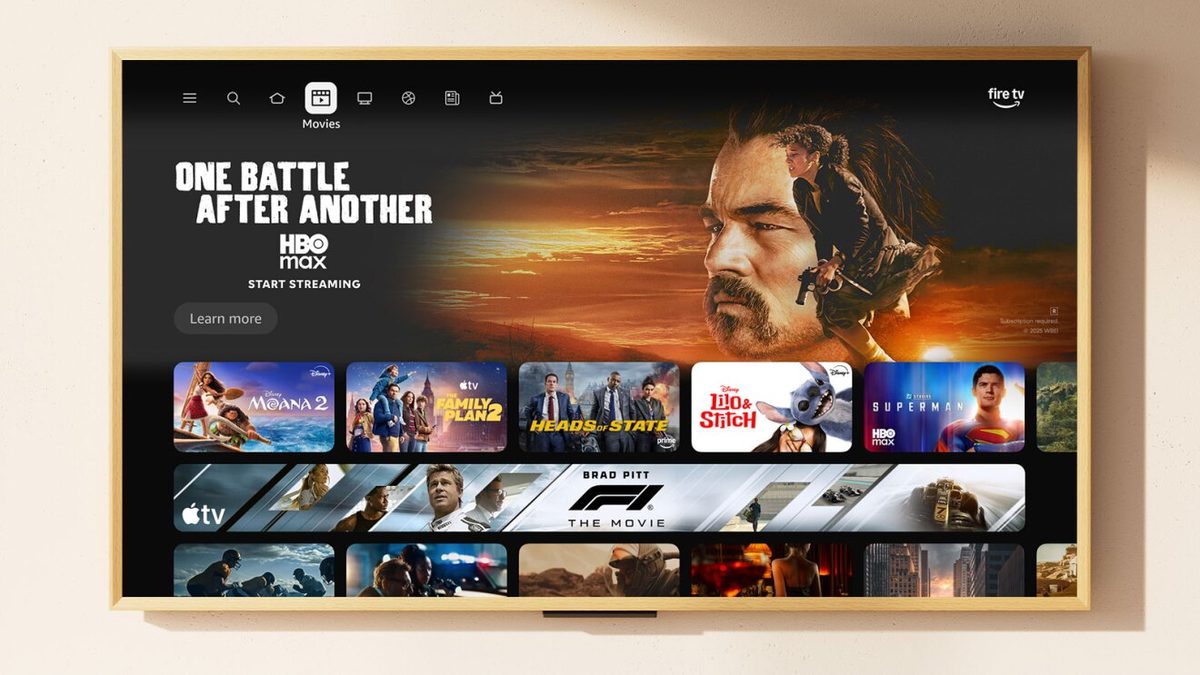
Amazon rolled out a Fire TV redesign that emphasizes content visibility and simplifies navigation, accompanied by updated Fire TV app and new Ember Artline televisions with customizable frames. The changes address user interface clutter and search time issues, launching first in the U.S. in February on select devices.
Fire TV Vice President Aidan Marcuss stated in an interview with TechCrunch, “As we brought that content forward, the [user interface] got a little cluttered — a lot of stuff and a lot of rows.” He added, “We know the data — there’s a lot of time spent searching,” and noted, “We…know that it could just be easier.” These observations prompted design modifications including rounded corners on elements, varied gradients for visual distinction, consistent typography across screens, and increased spacing between content items. Such adjustments reduce the sense of overcrowding while maintaining access to personalized rows like upcoming content through downward scrolling. Users now view apps in an expanded horizontal row on the home screen, addressing a prior limitation.
Previously, the home screen allowed pinning only six apps, a frequent user complaint documented by Amazon. The redesign shrinks app icon sizes, enabling visibility of more icons simultaneously and providing 20 scrollable app slots. This expansion accommodates greater variety without sacrificing quick access. Navigation at the screen’s top simplifies into distinct categories: Movies, TV, Live TV, Sports, and News. A dedicated search button positions to the left of the Home tab, facilitating immediate content queries from the primary screen.
New tabs organize content based on current viewing habits and subscriptions. They centralize access to ongoing watches across services and highlight discoverable options. Rows labeled “For You” present recommended movies or shows derived from user preferences. Free streaming movies appear in designated sections, alongside lists of top-ranked movies or shows. Subscription-only content receives dedicated visibility to encourage trials within existing accounts.
The Live TV tab aggregates streams from services embedding live TV capabilities, incorporating broadcast or cable channels for subscribed users. This consolidation streamlines switching between sources without menu diving. The Sports section specifically lists currently airing live games and scheduled upcoming events, drawing from various providers. Additional features reside under a three-line hamburger menu icon, including Games for interactive entertainment, Art & Photos for visual displays, the Appstore for downloads, Music Video & Audio for media playback, a universal watchlist named “My Stuff” spanning services, Settings for configurations, and further options.
Long-pressing the Home button activates a quick-settings panel. This interface permits adjustments to display settings such as brightness levels, audio enhancements like dialogue boosting, sleep timer activation, accessibility options, smart home controls, and integration of Ring camera feeds. Users can overlay the camera view on programming or perform other on-screen tweaks without navigating deep menus, enhancing convenience during sessions.
Underlying code rewrites accelerate interface performance. Marcuss explained, “On our most popular devices, this is 20% to 30% faster for the same functions, because it’s all about getting people to what they want to watch, fast.” These optimizations target common operations, reducing load times and transitions on high-usage hardware.
Alexa+ integrates directly into the platform. Users issue natural-language queries for content discovery, question refinement through conversation, follow-up requests, and contextual interactions. For example, with a movie or TV show tile selected, one can say, “Tell me more about that one.” More nuanced commands include “find me more movies that have the same look,” or requests to locate specific photos or art pieces. Beyond media, Alexa+ handles tasks like ordering an Uber. Following its early access phase requiring opt-in, Alexa+ transitions to a paid add-on subscription, with inclusion in Prime memberships.
The Fire TV mobile app receives updates combining classic remote control functionality with enhanced content discovery. This dual approach allows phone-based browsing independent of the TV remote, supporting shared decision-making in group viewing scenarios where multiple users contribute ideas via their devices.
Deployment begins in February on Fire TV Stick 4K Plus, Fire TV Stick 4K Max (2nd Gen), and Fire TV Omni Mini-LED Series within the U.S. Expansion follows later in spring to additional countries and devices such as Fire TV Cube (3rd Gen), Fire TV 2-Series of the latest generation, Fire TV 4-Series, Fire TV Omni QLED Series, and televisions from partners including Hisense, Panasonic, and TCL. The interface launches concurrently on Amazon’s new Ember Artline TVs.
Ember Artline TVs introduce frames matching room aesthetics in 55-inch and 65-inch sizes, starting at $899. Specifications encompass 4K QLED screens achieving 800 nits brightness, a 1.5-inch thin profile, matte finish minimizing glare, Dolby Vision support, HDR10+ compatibility, and Wi-Fi 6 connectivity. These attributes ensure high-quality visuals and network performance.
Ten frame options provide customization: Walnut, Ash, Teak, Black Oak, Matte White, Midnight Blue, Fig, Pale Gold, Graphite, and Silver. Variations in colors, textures, and geometries align with diverse décors. Frames enhance utilization of Fire TV’s Ambient mode, active when idle, displaying over 2,000 free art pieces or personal photos.
Alexa+ extends Ambient interactions through voice commands. Examples include “Alexa, create a slideshow of our family trip to Colorado” or “Alexa, show photos from our wedding,” pulling from Amazon Photos collections for tailored displays.